
What you can do in the Sales Plugin
View notifications: Use the notification bell in the top-right corner of the Sales Plugin to check prospect alerts.
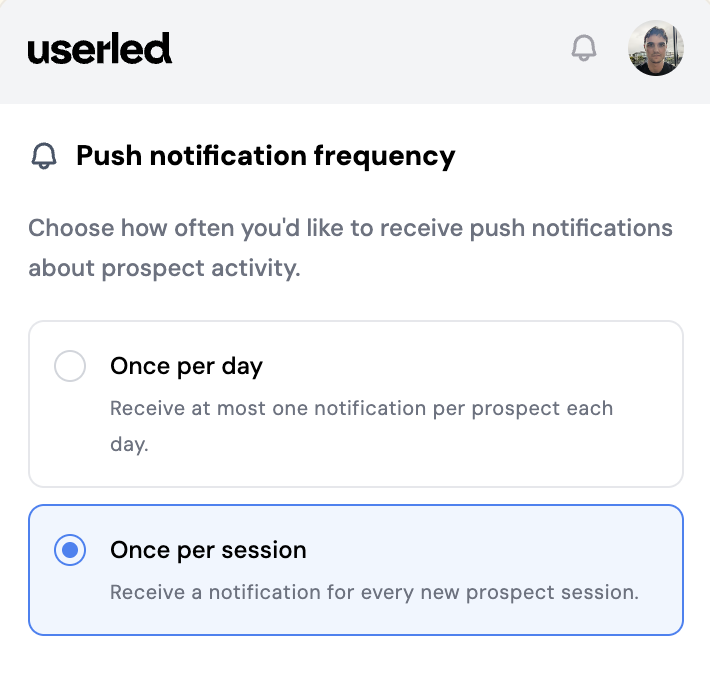
Manage notification preferences: Choose how often you receive notifications for each prospect.
Create personalised images: Generate personalised images and paste them into outreach channels like LinkedIn, Slack, and other chat tools.
Review prospect activity: Scan prospect activity in a cleaner feed where repeated back-to-back activity is grouped together.
Generate outreach assets: Create sales assets directly from the plugin to support faster outreach.
How to manage notification preferences
1. Open the Sales Plugin
2. Click the User icon in the notifications menu
3. Select Notifications
4. Choose how often you want to receive notifications:
- Once per session per prospect
- Once per day per prospect
5. Save your changes
How to create a personalised image
1. Open the Sales Plugin
2. Go to the prospect you want to personalise outreach for
3. Create your personalised image
4. Copy or paste the image into your outreach channel, such as LinkedIn, Slack, or another chat tool
How prospect activity is displayed
The activity view groups duplicate back-to-back activity into a single row with the total accumulated time. This makes the prospect feed easier to scan and reduces repeated entries.
