Webhooks enable you to send activity data downstream to other systems in your marketing tool stack. More specifically, activity from key accounts and contacts as they engage with your website or Userled assets.
Currently, we have the following webhooks available:
Session Ended - notifies you when a visitor ended a web session as provides a summary of their visit. The summary can include activity from both Userled assets and your website.
Company Revealed by Clearbit - you will receive this event when a new company has been uncovered/revealed through Clearbit
To get started, go to the Integrations panel where you’ll find the new Webhooks integration.
On the webhooks page, after clicking on New Webhook you will be prompted to configure a new webhook.
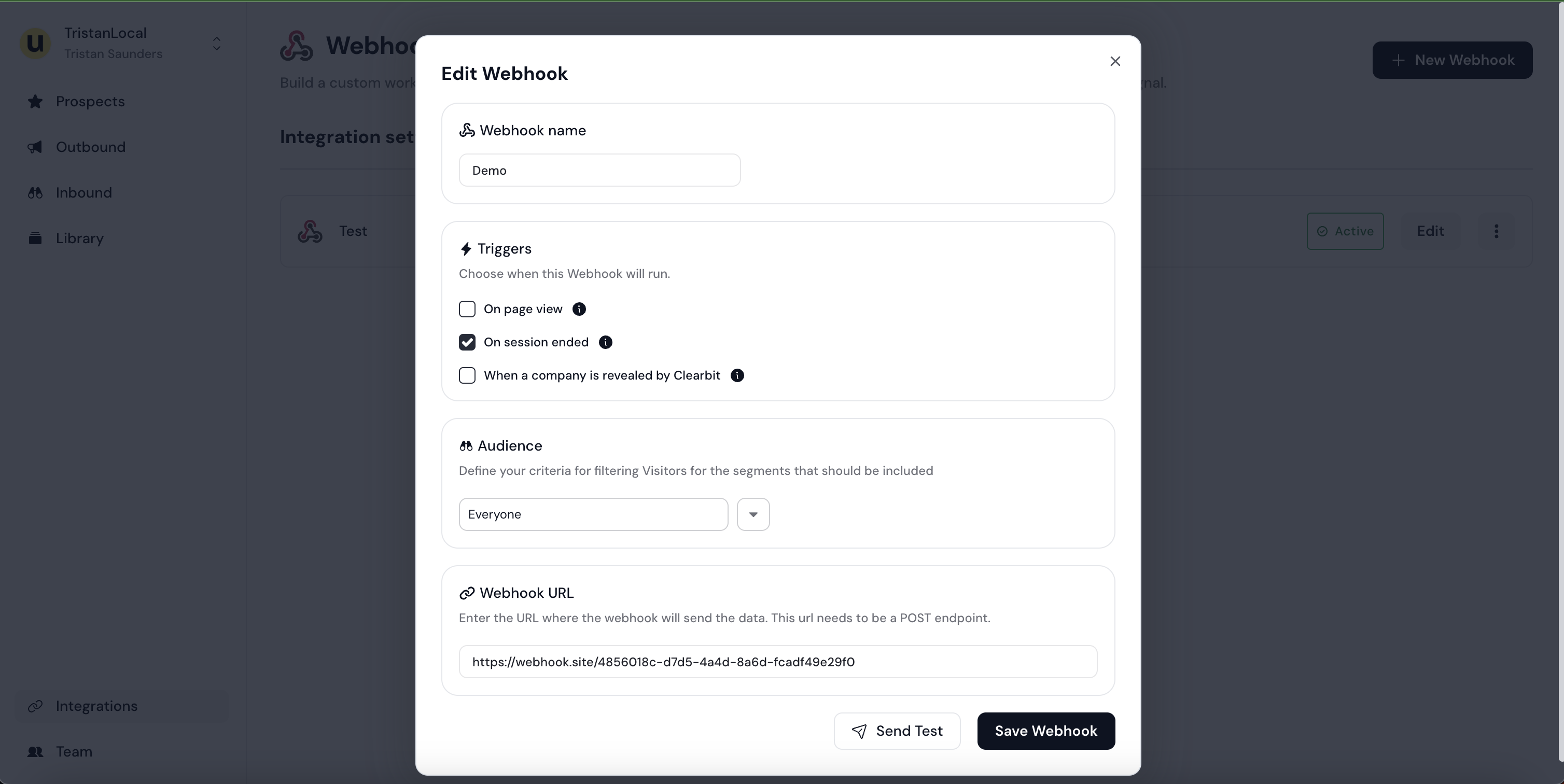
The Name of the webhook should be descriptive and help you identify it later;
The Trigger specifies the types of interactions that will trigger this webhook
The Audience defines what accounts or visitors you want to get notified about
The Webhook URL is the endpoint Userled will be calling to notify each interaction occurred.
This could be an internal webhook listener you have implemented in your platform, or one provided by 3rd party automation services like Zapier or n8n.
Please note, we expect this to be a POST endpoint.
All of these properties can be edited after the webhook has been created.
If you wish to test the webhook listener, you can click Send Test which will make a request to the endpoint provided with some dummy data.
You can subscribe to 2 webhook types
Session Ended: The session_ended event notifies you when a visitor ended a web session as provides a summary of their visit. The summary can include activity from both Userled assets and your website.
Company Revealed by Clearbit: The account.created event notifies you of a company that was uncovered by Clearbit.
{
    "trigger": "session_closed",
    "actor": {
        "accountName": "Attest",
        "contactName": "Jane Smith"
    },
    "hubspotAccountId": "6957942223",
    "hubspotContactId": "11996401",
    "salesforceAccountId": "0018e00000GVUCTAA5",
    "salesforceContactId": "003SZ000005jHWgYAM",
    "clearbitAccountId": "298aa775-c2de-427d-a498-ff96fdf3b1a2",
    "timestamp": "2024-05-31T14:03:19.508Z",
    "sessionEnded": {
        "pageViews": [
            {
                "url": "http://localhost:3000/lp/uazDeuxL",
                "domain": "localhost:3000",
                "path": "/lp/uazDeuxL",
                "timeSpent": 59
            }
        ],
        "startedAt": "2024-12-15T14:11:44.177475Z",
        "endedAt": "2024-12-15T14:13:11.742139Z",
        "sessionLength": 59,
        "sessionCategory": "deal_activity"
    }
}

// Note that the `trigger` value indicates which payload will be populated
// in this case, "session_ended" -> "sessionEnded"
// Note that if Userled was able to associate a visitor to known CRM
// objects then the CRM Id keys will be present.{
"trigger": "account.created",
"clearbitAccountId": "298aa775-c2de-427d-a498-ff96fdf3b1a2",
"clearbitCompany": {...},
"timestamp": "2024-05-31T13:18:28.205334Z",
"accountCreatedPayload": {
"accountName": "Attest",
"accountDomain": "askattest.com"
}
}
// Note that the `trigger` value indicates which payload will be populated
// in this case, "account.created" -> "accountCreatedPayload"For more information about the clearbitCompany payload, please refer to the Clearbit API docs.
If the visitor that triggers the webhook is tied to a known account and contact in your CRM Userled will enrich the webhook events with the associated CRM identifiers.
The following keys will be added to the webhooks payload when known salesforceAccountId , salesforceContactId, hubspotAccountId, hubspotContactId
When the visitor is known, Userled will populate the actor field with information about the visitor. For example:
"actor" : {
  "accountName" : "Attest",
  "contactName" : "Jane Doe"
}Here’s a quick walkthrough creating a webhook listener with https://n8n.io/ and configuring it in Userled.